Blog · Tutorial · updated
How to open a GPX file on iPhone, Android and computer
You have a .gpx file on your phone and nothing happens when you tap it? That’s normal: a GPX file doesn’t open on its own. Here is the full route on iPhone with screenshots, then the other ways to do it on Android, computer, Google Maps, Apple Maps and watches.
The short answer: a GPX file opens in a maps or hiking app. On iPhone, open Hikez, go to the Routes tab, tap + and pick your file in Files: the route is added to your library with its distance and elevation gain, and you tap Start navigation to follow it, even without a signal.
Full disclosure: Hikez is our app, and it only exists on iPhone. For Android and computers, we show you what works elsewhere, based on each tool’s official help.

A GPX file is just text: what it contains decides what you see
A GPX file is a plain text file in XML format. Any text editor can show it, and that is the quickest way to know what to expect before you open it in an app. It can hold three kinds of content, and they change what appears on screen:
- A track (
trktag): the list of points someone actually walked through. It draws the continuous line of the trail. - A route (
rtetag): a series of waypoints worked out by software. The line is rougher and there are no timestamps. - Waypoints (
wpttag): isolated pins, such as a summit or a parking lot. With no track, nothing joins them.
<gpx version="1.1" creator="My app">
  <wpt lat="45.0010" lon="6.5020">      <!-- a waypoint -->
    <name>Parking</name>
  </wpt>
  <trk>
    <name>Lake loop</name>               <!-- a track -->
    <trkseg>
      <trkpt lat="45.0010" lon="6.5020"><ele>1975</ele></trkpt>
      <trkpt lat="45.0016" lon="6.5031"><ele>1982</ele></trkpt>
      <trkpt lat="45.0024" lon="6.5047"><ele>1991</ele></trkpt>
    </trkseg>
  </trk>
</gpx>How to check what is inside your file
On a computer, open it with TextEdit (Mac) or Notepad (Windows) and look for trkpt, one per point of the track, or rtept for a route. On iPhone, the route view in Hikez tells you in seconds: if the map shows a line, you have a track.
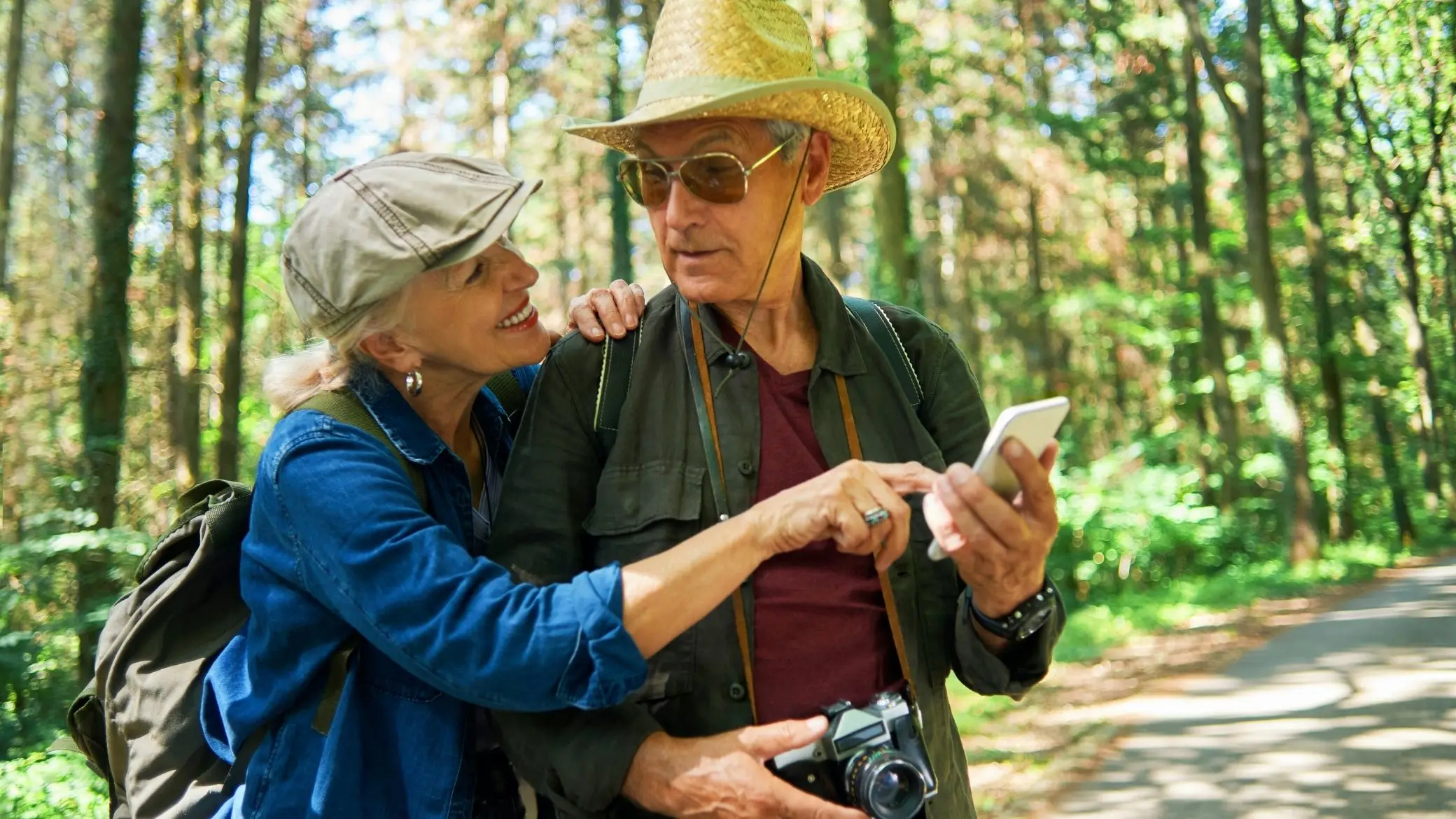
How to open a GPX file on iPhone with Hikez, step by step
Already have your GPX file on your iPhone, in Files or Downloads? Here is what comes next, from the Routes tab to navigation, with the app’s real screens. Tested on an iPhone running iOS 27, with a 6-mile hike near Ceillac in the French Alps.
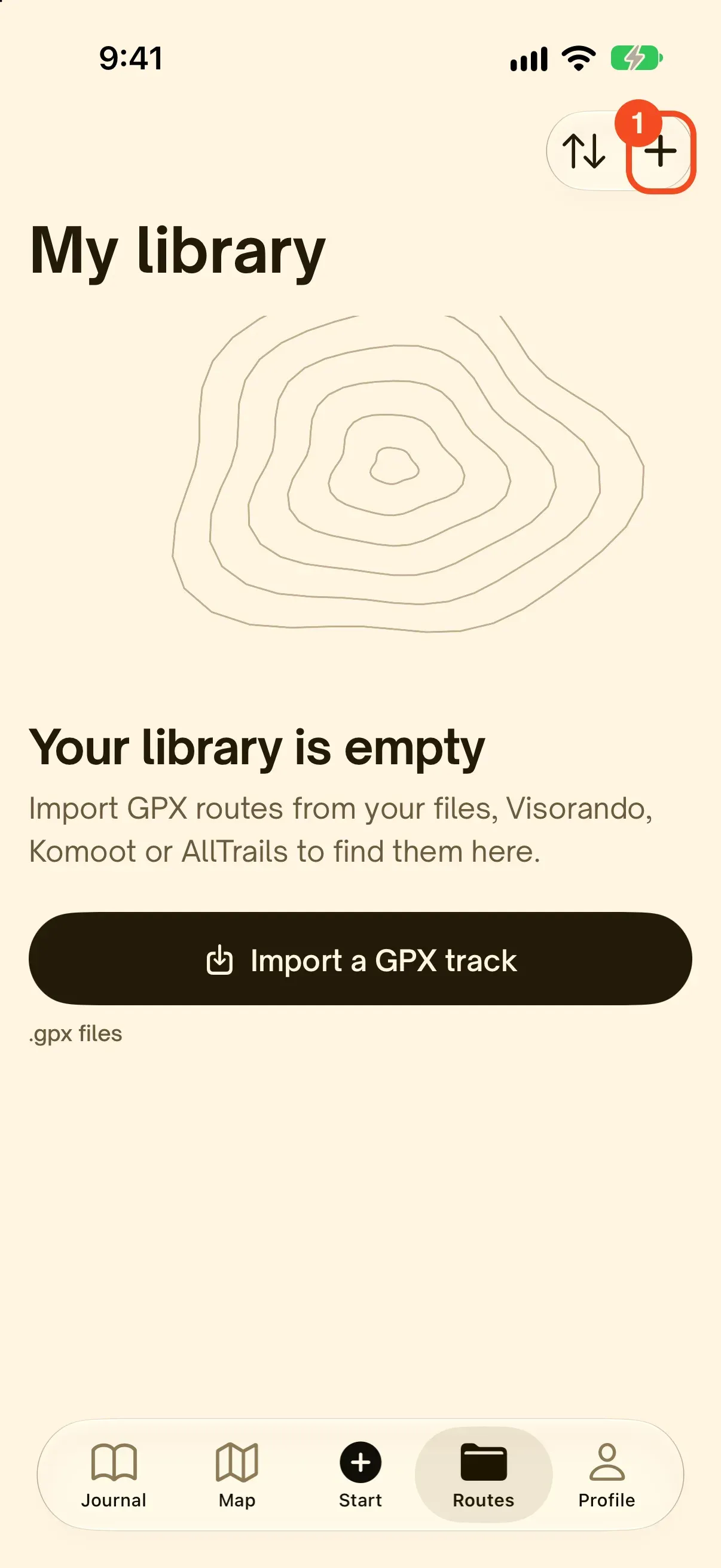
Open the Routes tab and tap +
In Hikez, open the Routes tab: it is your library. Tap the + at the top right. When the library is empty, the Import a GPX track button does the same thing. Your GPX file is already on your iPhone, downloaded from a trail site or received by email: there is nothing else to prepare.
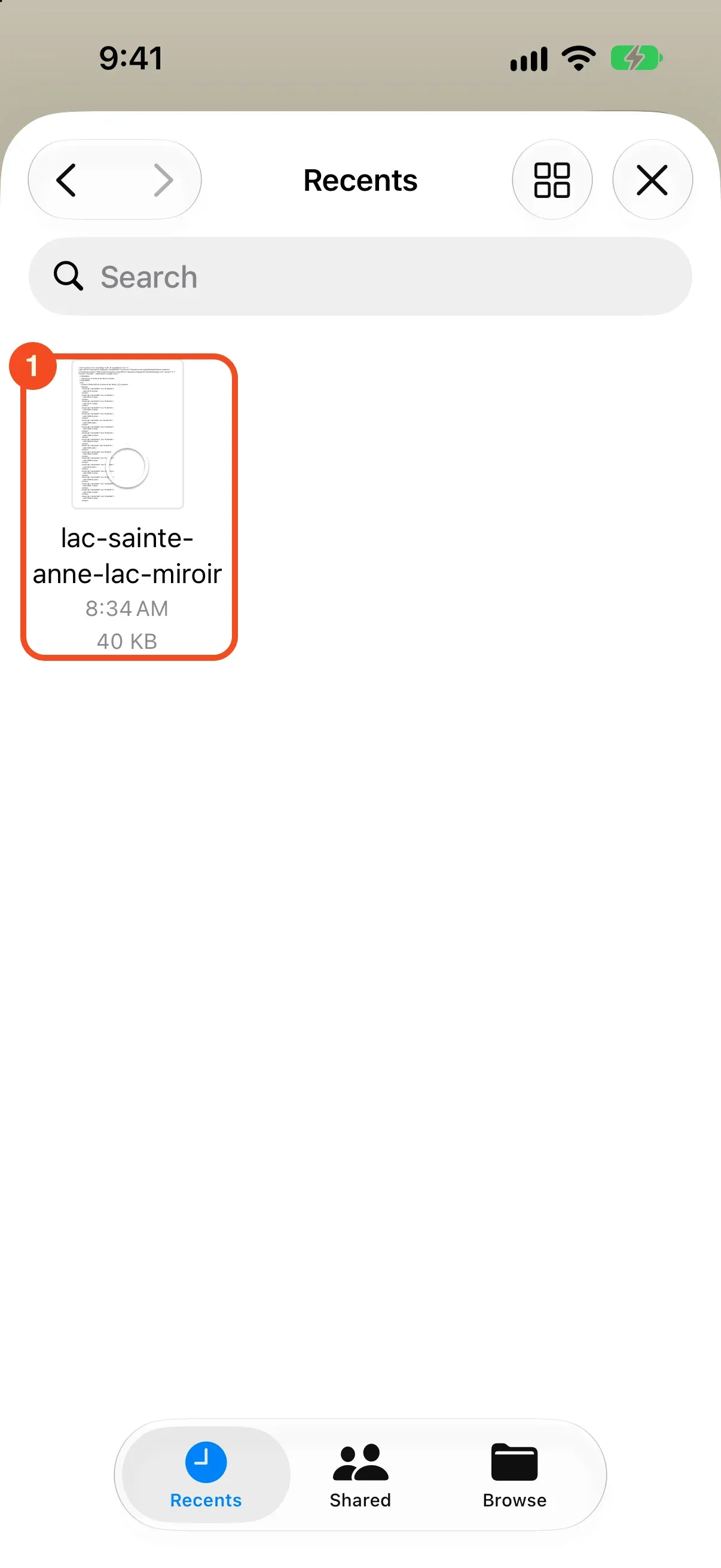
Pick your file in Files
Hikez opens the iPhone Files picker. Go to wherever your GPX is stored: Recents, Downloads, iCloud Drive or another app’s folder. Tap the file to select it. You can select several, and they import together.
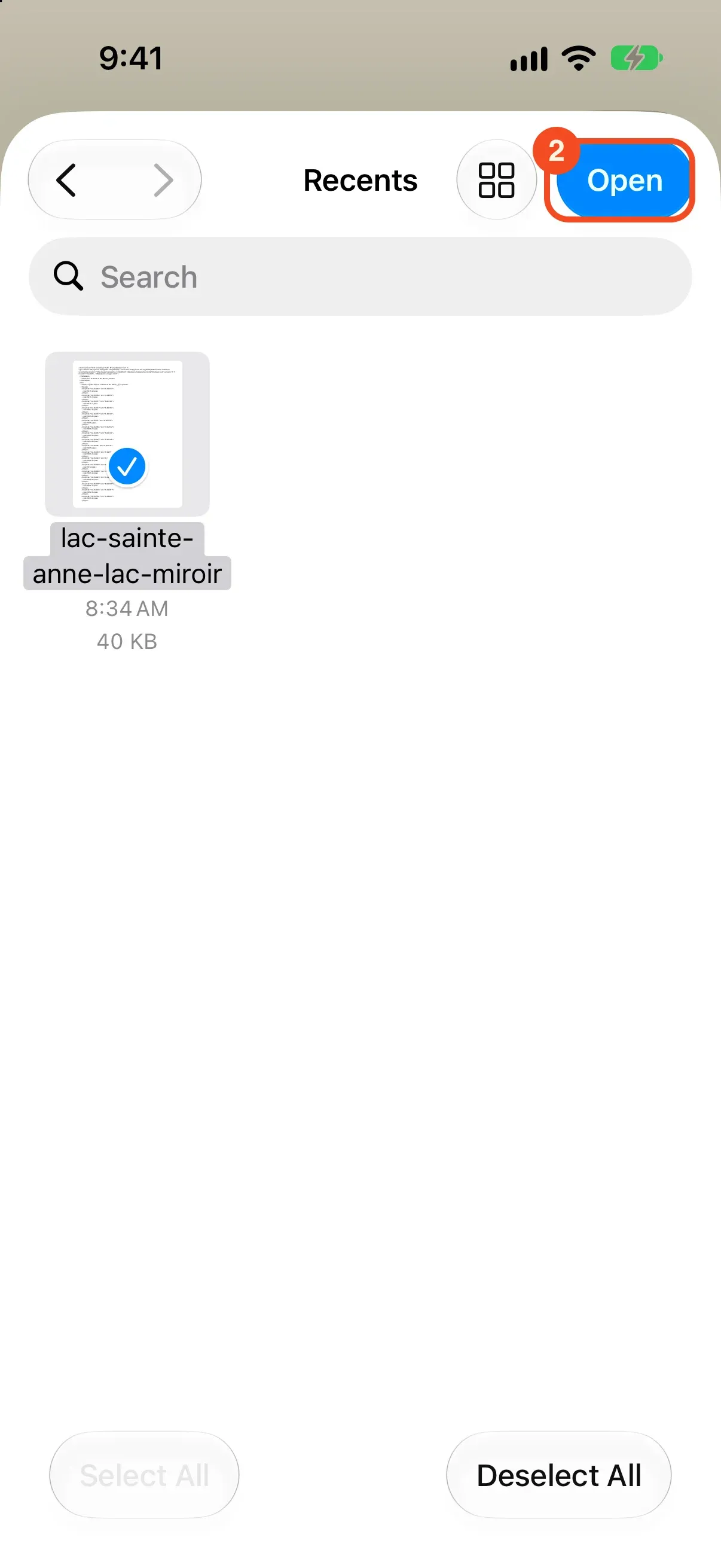
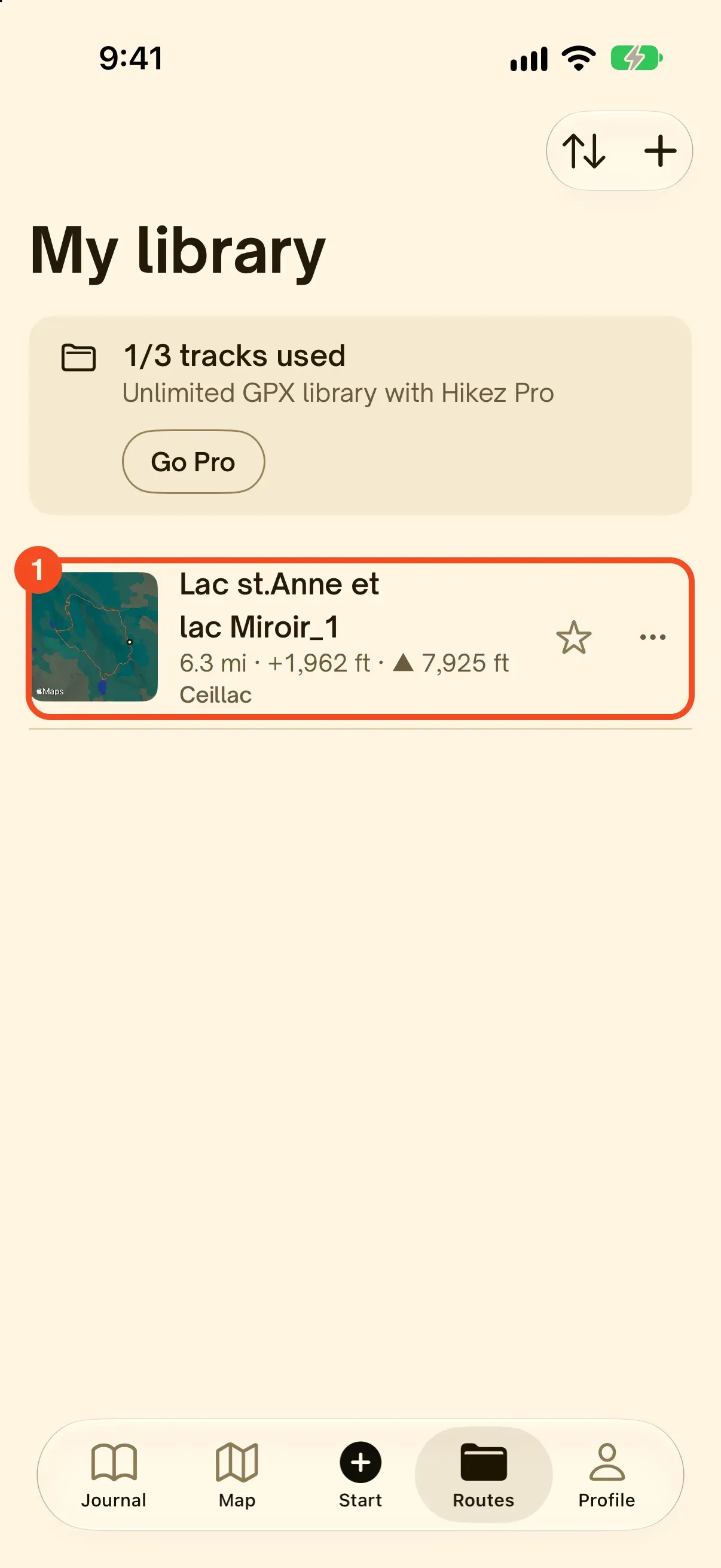
Tap Open: the route lands in your library
Tap Open at the top right. Hikez reads the file, then the route appears in your library with its map, distance, elevation gain and maximum altitude. If the file is empty or unreadable, Hikez tells you. If the route is already in the library, it tells you that too.
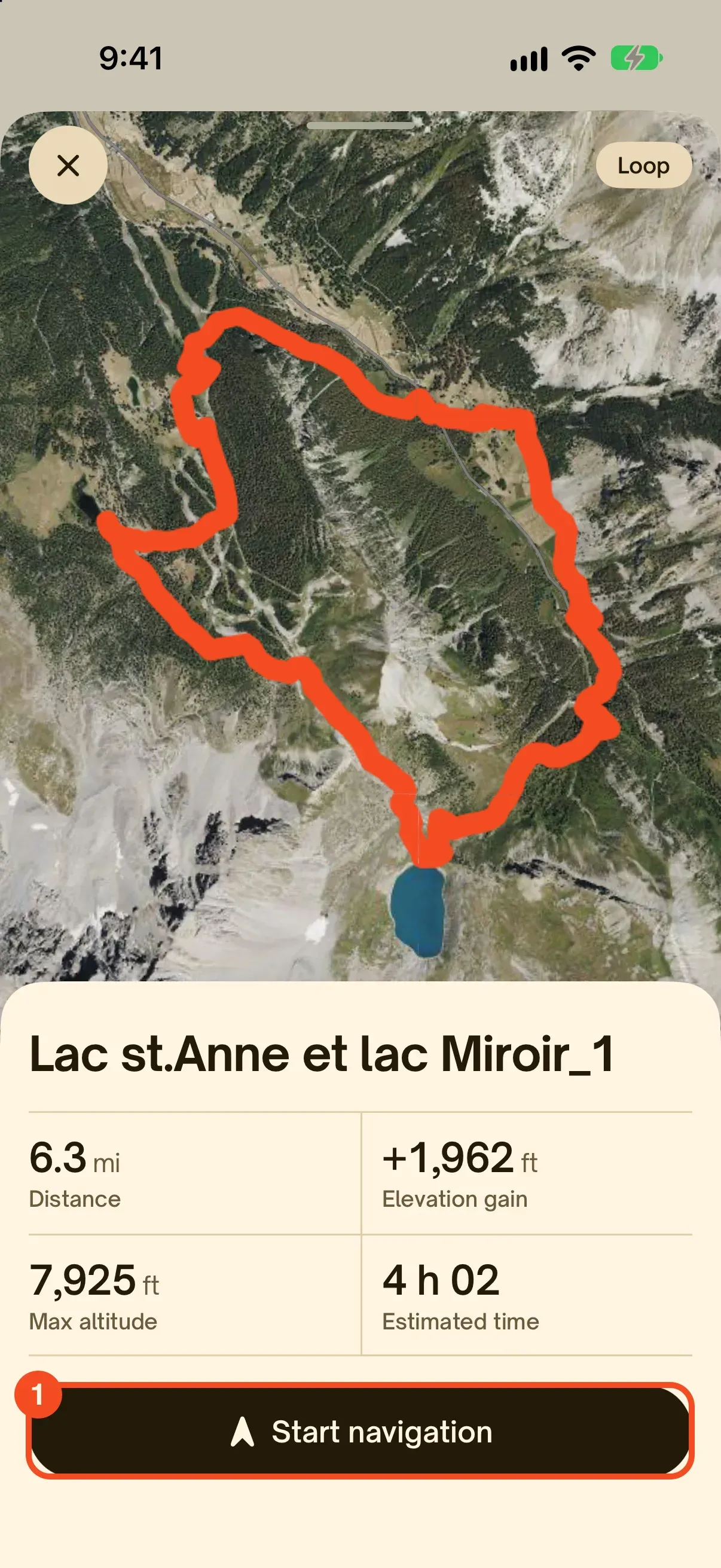
Tap the route, then start navigation
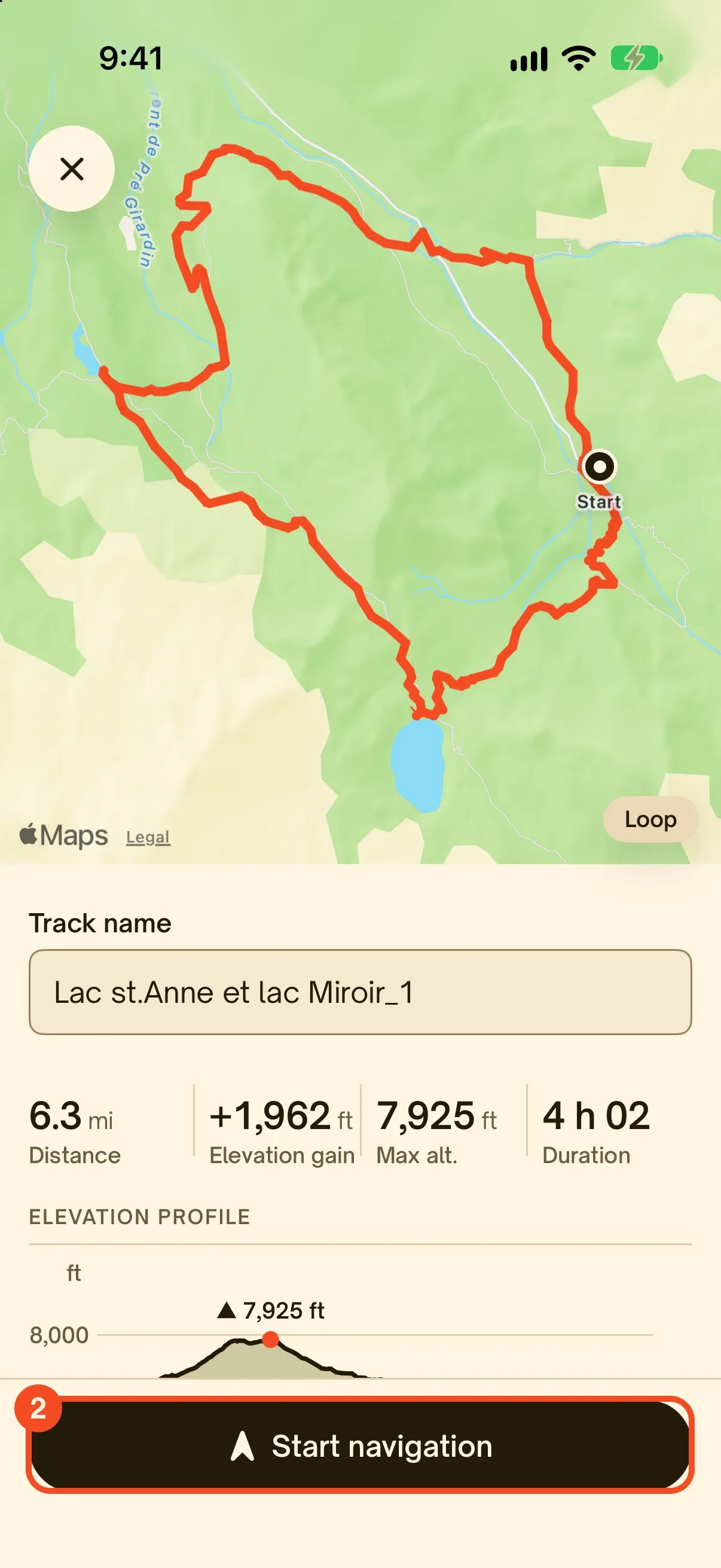
Tap the route to open it on the satellite view, with distance, elevation gain, maximum altitude and an estimated time. Tap Start navigation: you see the route name and its elevation profile, then you set off. Hikez warns you if you leave the trail.
Find it again any time
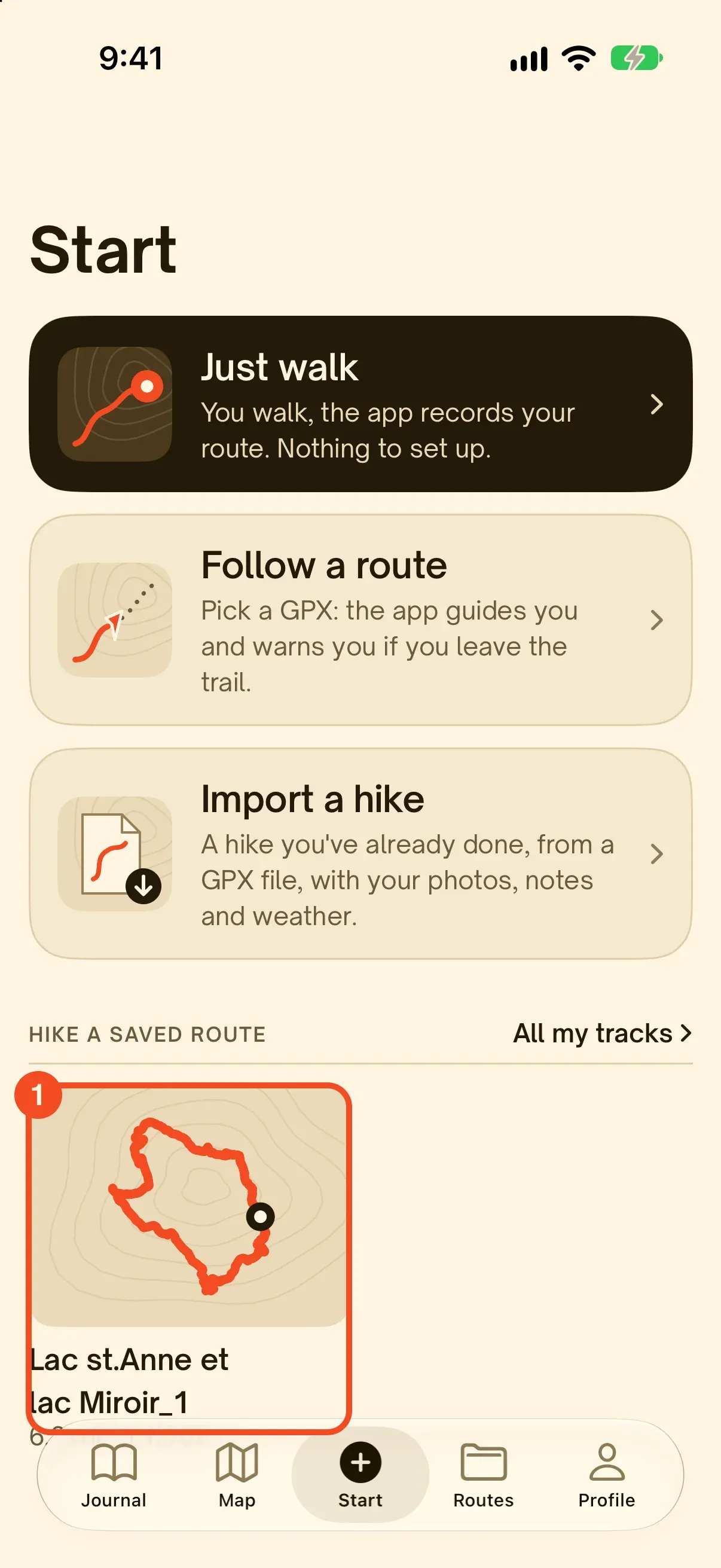
The route stays in your library, so you never import the file twice. Find it in the Routes tab, or in the Start tab under Hike a saved route, which keeps your latest routes one tap away.
Two other entry points in the app
The Start tab offers two more ways to use a GPX file:
- Start tab, Follow a route: you pick a GPX, the app guides you and warns you if you leave the trail.
- Start tab, Import a hike: for a hike you have already done, from a GPX file, with your photos, notes and weather. It goes into your journal.
Opening isn’t enough: following the route without a signal
A GPX file in a viewer is just a picture. Out on the trail, three more things matter.
- The map without a signal. Download the offline maps for your area before you leave. In Hikez they are free: IGN in France, OpenStreetMap elsewhere.
- Tracking with the screen off. Hikez follows your position even when the screen is off, to save battery.
- The off-trail alert. If you stray from the trail, Hikez warns you.

Other ways to open a GPX file
Hikez is our app, and it isn’t the only option. Here is what works on each device. For other publishers’ apps we rely on their official help pages, checked on October 30, 2026: we have not tested them ourselves.
| Device | Option | How to do it | Good to know |
|---|---|---|---|
| iPhone | Hikez | Routes tab, +, pick the file in Files, Open (steps above) | Free, offline maps included. iPhone only, GPX only. |
| iPhone and Android | Gaia GPS | Save the file on your device, open Saved in the app, then use the three-dot menu at the top right to import it (official help). | The official help covers GPX and KML files for the iOS app. |
| iPhone and Android | Organic Maps | Import the file inside the app: its FAQ describes importing bookmarks and tracks in KML, KMZ, GPX or GeoJSON. | Free, no ads, OpenStreetMap maps. |
| iPhone and Android | Komoot | Profile, Saved tours, Import, then Import file (GPX, FIT or TCX): the steps from the official help. | The help notes a file size limit: split a file that is too large. |
| Great Britain | OS Maps | The official OS Maps GPX FAQ lists OS Maps among the apps that open GPX files, with Garmin Connect, Garmin Explore, the Suunto app and Komoot. | Official Ordnance Survey maps. |
| Android | OsmAnd | Tap the GPX, KML or KMZ file from a messaging app, an email, Google Drive or a file manager, then choose OsmAnd (official documentation). | A very complete app for maps and navigation. |
| Android | GPX Viewer | Open the file with the app, which reads GPX, KML, KMZ and LOC files. | Free on Google Play, rated 4.6 out of 5 by about 52,000 users (October 2026). |
| Computer | Online viewer | Drag the file onto gpx.studio, viewgpx.com or viewmygpx.com. | No install. gpx.studio can also edit the track. |
| Computer | Desktop software | Google Earth Pro: File, Open or Import, then the file type GPS (.gpx, .loc). QGIS and Garmin BaseCamp also open GPX files. | To analyze or edit a track in detail. |
| Computer | Google My Maps | Create a map, Add layer, Import. | Shows the trail, no guidance. Limits: see below. |
| Watch or GPS | Maker’s app | Import the file into the maker’s app, for example Garmin Explore, then sync. | Do it the night before: syncing takes a while. |
On Android
Hikez doesn’t exist on Android, so here is what other apps’ help pages say. The principle is the same as on iPhone: install an app that reads GPX files first, then open the file from your Downloads folder or your file manager. If a compatible app is installed, Android offers it. If not, the browser shows plain text, or nothing happens.
On a computer
No software is required: an online viewer shows the track on a map. A computer is also the place to spot a file’s flaws before you leave, on a big screen: a straight line several miles long in the middle of the track means the receiver lost its signal while recording.
With Google Maps: the catch
The Google Maps app doesn’t load GPX files. Google My Maps accepts them: on a computer you create a map, click Add layer, then Import. Google’s help sets limits: 5 MB for unzipped KML and KMZ files, 40 MB for other files, and no more than 2,000 rows. My Maps shows the trail, but it doesn’t guide you and doesn’t warn you when you leave it.
With Apple Maps
As far as we can tell (October 2026), Apple Maps has no GPX import: Apple Support Community answers and user threads say the same. To see and follow a GPX file on an iPhone, use an app that reads them, such as Hikez.
On a watch or a GPS
A watch doesn’t download the file itself: it receives a course synced from the maker’s app. Import the GPX into that app, let the watch sync next to your phone, then check that the course name shows up on the watch. Do it the night before, not in the parking lot.
Your GPX file won’t open: the most common causes
The file came as a .zip
Some sites deliver the GPX in an archive, with photos or a PDF. In Files, tap the archive to unzip it, then open the .gpx file inside.
It ends in .gpx.txt
A browser can add .txt to the end of the name. In Files, press and hold, tap Rename and remove the .txt. The picker in Hikez only offers .gpx files.
Nothing shows, or only pins
The file holds only waypoints, or no valid track. Hikez then says the file doesn’t contain a valid GPS track. Download it again, or pick a file that has a track.
Elevation gain is zero
The file has no elevation. That isn’t an app error: the ele tag is optional. A file calculated by routing software sometimes has none.
A straight line crosses the map
The receiver lost its signal while recording, or two pieces of track were stitched together. The track is still usable, but compare its distance with the trail guide before you leave.
The format isn’t GPX
Hikez doesn’t read KML, FIT or TCX files and says so. Download the route again from the original site and choose the GPX format: most sites offer it.
Where to find good GPX files
- Trail and route sites: a trail’s page often has a button to download the GPX.
- Tourist offices, parks and land managers: they publish the tracks of their marked trails.
- The Hikez community: hikes shared by the people you follow, with their track to grab as a GPX in one tap.
- Your own hikes: with Hikez Pro, you export your hikes as GPX to share them or open them elsewhere.
GPX file FAQ
How do I open a GPX file on iPhone for free?
Install an app that reads GPX files, then import the file from inside the app. With Hikez: Routes tab, tap +, pick the file in Files, tap Open. It is free: importing, the satellite view, guided navigation with an off-trail alert and offline maps cost nothing. Only the library is limited to 3 routes without Hikez Pro.
What app opens GPX files on iPhone?
Hikez opens and follows GPX files for free, with offline maps. Organic Maps and Komoot also import GPX files on iPhone, and so does Gaia GPS, which documents the import in its help center. The table in this article gives the steps for each. To choose a hiking app more broadly, read our comparison.
Can I open a GPX file in Google Maps?
The Google Maps app doesn’t load GPX files. Google My Maps does, on a computer: create a map, tap Add layer, then Import. Google’s help lists GPX among the accepted formats and asks you not to import more than 2,000 rows. My Maps shows the trail but doesn’t guide you along it.
Can I open a GPX file in Apple Maps?
As far as we can tell, no: Apple Maps has no GPX import, and Apple Support Community answers and user threads say the same. Use an app that reads GPX files, such as Hikez, to see and follow the route.
Can I open a GPX file in Google Earth?
Yes, in Google Earth Pro on a computer. Choose Open or Import from the File menu, switch the file type to GPS (.gpx, .loc), select your file and click Open.
What website can I use to open a GPX file?
Any online GPX viewer: drag the file onto the page and the route appears on a map with its elevation profile. gpx.studio, viewgpx.com and viewmygpx.com all do this, and some work in your browser without uploading the file.
Can I read a GPX file as text?
Yes, there is nothing to convert: a GPX file is already a text file in XML format. Open it with TextEdit (Mac) or Notepad (Windows) and look for trkpt, one per point of the track.
Does a GPX file work without an internet connection?
The file itself does: it is a plain text file stored on your phone. What needs a signal is the map behind it. Download the offline maps for your area before you leave. In Hikez they are free (IGN in France, OpenStreetMap elsewhere).
What is the difference between GPX, KML, FIT and TCX?
They all describe GPS positions. GPX is the most common exchange format for hiking. KML comes from Google Earth. FIT and TCX come from sports watches and bike computers. Hikez reads GPX only: download the route again in GPX format from the original site.
Can I open a GPX file on Android with Hikez?
No, Hikez only exists on iPhone. On Android, use an app such as OsmAnd, Organic Maps or GPX Viewer: their steps are in the table in this article.
How we made this guide
The iPhone steps were followed on October 30, 2026 on a virtual iPhone (Apple’s simulator) running iOS 27, with Hikez, a real 6-mile GPX file already in Files and the app’s original screens. Steps for other apps come from their official help pages (Gaia GPS, Komoot, OsmAnd, Organic Maps, OS Maps, Google My Maps), checked the same day: we haven’t tested them. Found a mistake, or a step that has changed? Write to us: support@hikez.app.
Try Hikez, it is free